WB Tech

Do you have a project in your
mind? Connect with us.

Contact Us

  • +91 88-6087-6087
  • Info@webeside.in
  • 3H-47, NIT 3, Faridabad, Haryana - 121001

Subscribe

We bring brands out of startups and results out of marketing with our Web Development, Graphic Design, Digital Marketing and Management Services.

Best CRM Software for Small Business in India (2026): Compare, Choose & Grow

QUICK ANSWER
 
The best CRM software for small businesses in India in 2025 are:
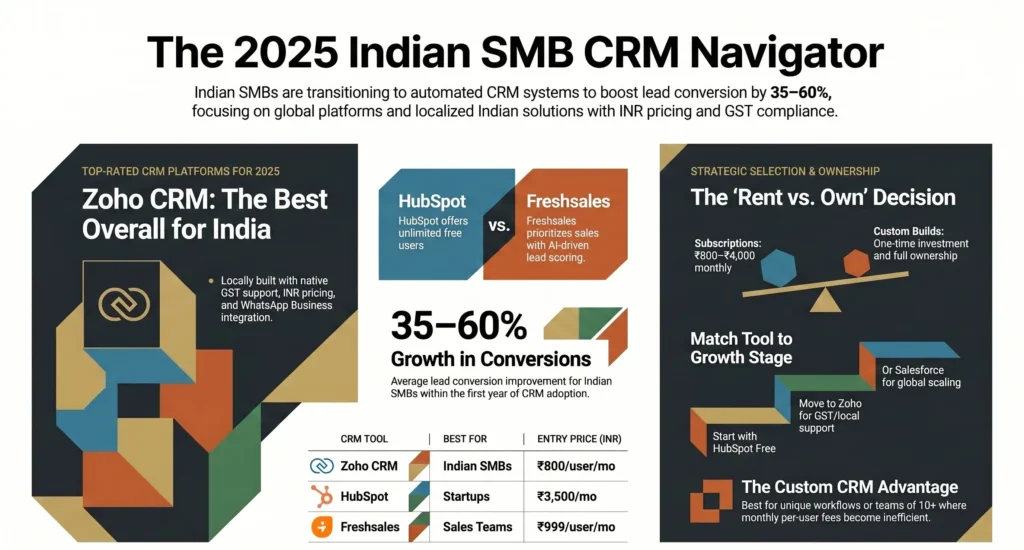
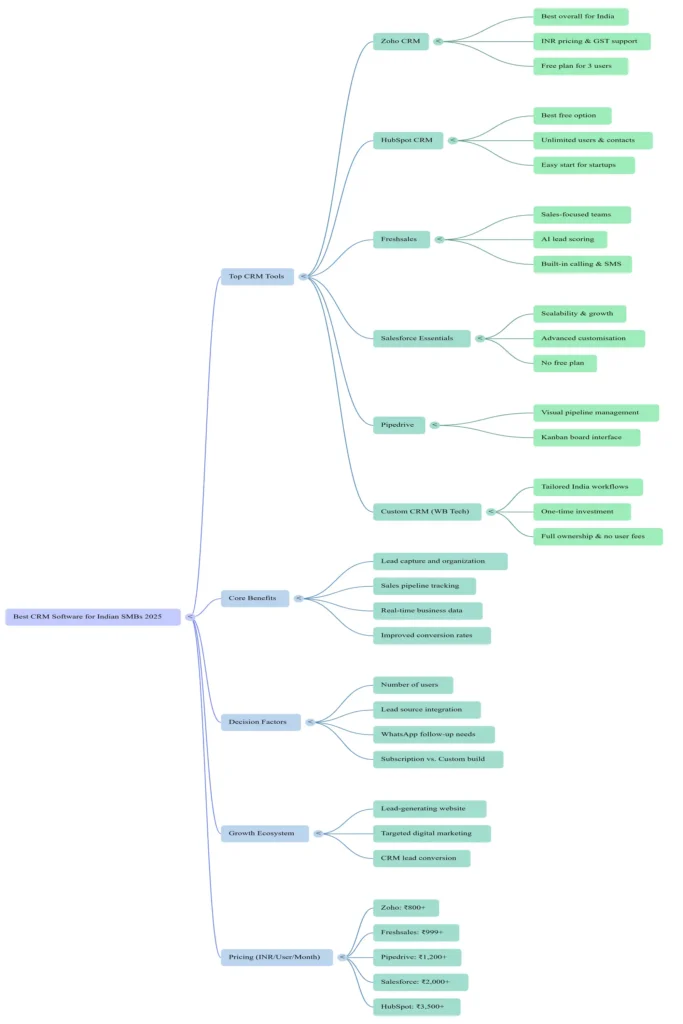
1. Zoho CRM — Best overall for Indian SMBs (free plan available, GST support, INR pricing)
2. HubSpot CRM — Best free CRM for startups (unlimited users, zero cost)
3. Freshsales — Best for sales-focused teams (AI lead scoring, built-in calling)
4. Salesforce Essentials — Best for businesses planning to scale fast
5. Pipedrive — Best for visual sales pipeline management
6. Custom CRM by WB Tech — Best for businesses that need a 100% India-specific solution
 
Most Indian SMBs should start with Zoho CRM or HubSpot CRM (both free). For a CRM built
exactly around your workflow, WB Tech offers custom CRM development — contact us for a free demo.

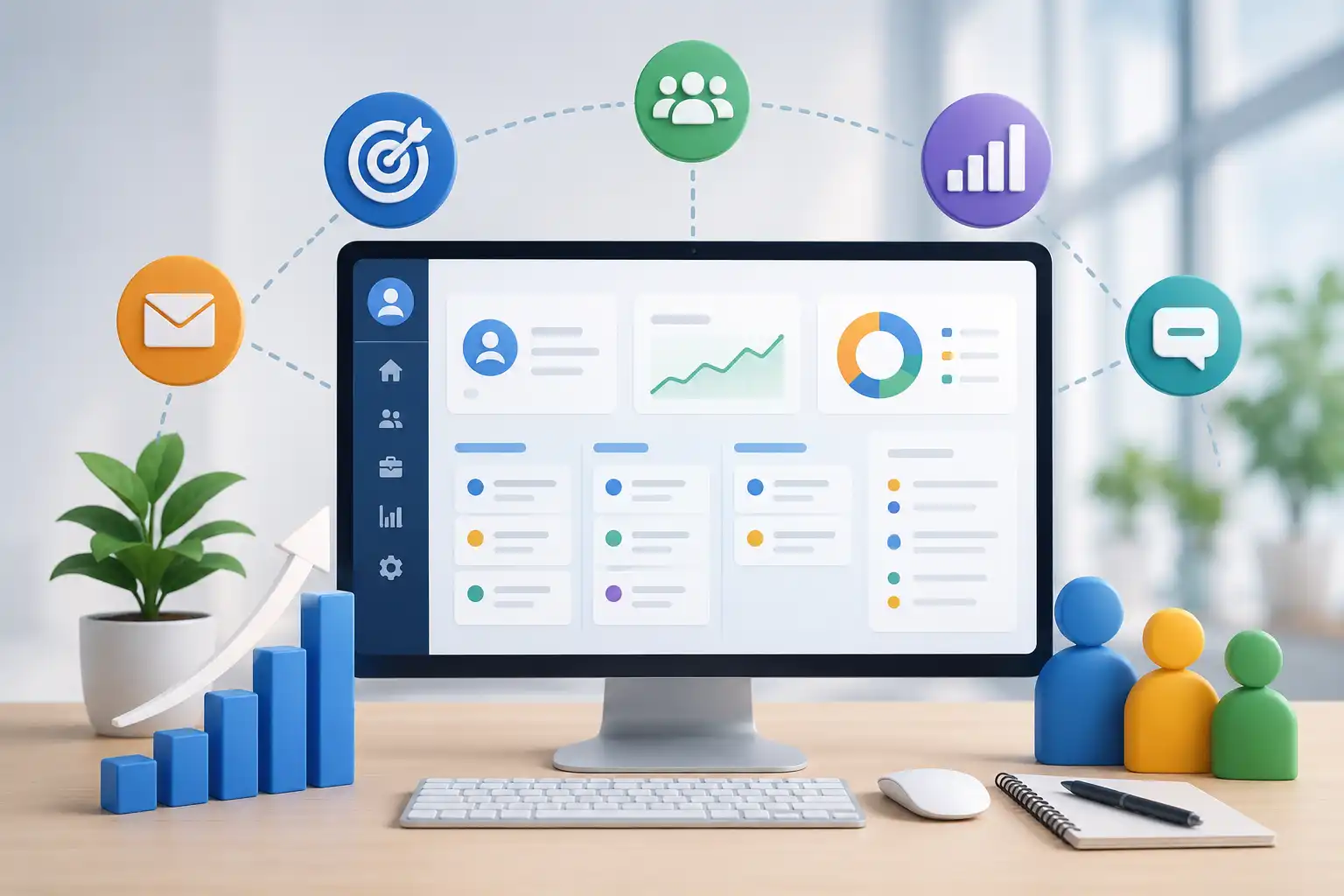
crm software

Why Every Small Business in India Needs a CRM in 2026

India has over 63 million small and medium businesses — and the ones that are growing fastest have one thing in common: they stopped managing customers in Excel sheets and WhatsApp chats, and started using a CRM.

A CRM (Customer Relationship Management) system is software that organises all your customer interactions, tracks your sales pipeline, and ensures every lead is followed up — automatically. Without it, leads go cold, follow-ups get missed, and revenue is left on the table.

According to NASSCOM, Indian SMBs that adopted digital tools including CRM software reported a 35–60% improvement in lead conversion rates within the first year. Yet most small business owners in India either do not know which CRM to choose, or assume CRM software is only for large companies.

It is not. The best CRM tools for small businesses in India are affordable, many are free, and some are built specifically for the Indian market.

At WB Tech, we work with businesses across Faridabad, Delhi NCR, Gurugram, and across India to build the right digital infrastructure — including websites, digital marketing, and custom CRM systems. This guide gives you an honest, up-to-date comparison of every major CRM available in India in 2025, with real INR pricing, so you can make the right decision today.


What Is CRM Software?

CRM (Customer Relationship Management) software is a platform that helps businesses manageall customer and lead interactions from one dashboard — including contact details, salespipeline stages, follow-up reminders, email communication, and performance analytics.

For a small business in India, a CRM does three critical things:

Captures and organises every lead: Whether a lead comes from your website, Google Ads, WhatsApp, or a referral — it is stored, tagged, and tracked automatically.

Manages your sales pipeline: You can see exactly where every deal stands, what action is needed, and which opportunities are going cold.

Gives you real business data: Conversion rates, revenue forecasts, team performance, and campaign ROI — all in one place, in real time.

If your business is running digital marketing campaigns — Google Ads, Meta Ads, or SEO — a CRM ensures every lead those campaigns generate is captured and converted instead of slipping away.


Best CRM Software for Small Business in India — Quick Comparison (2026)

Here is a side-by-side comparison of the top CRM tools available in India right now:

CRM ToolBest ForFree PlanPrice (INR/user/mo)India SupportRating
Zoho CRMIndian SMBs & startups✅ Yes (3 users)₹800✅ Full4.6 / 5
HubSpot CRMStartups & marketing teams✅ Yes (unlimited)₹3,500/mo✅ Full4.5 / 5
FreshsalesSales-driven teams✅ Yes (3 users)₹999✅ Full4.4 / 5
Salesforce Ess.Scaling businesses❌ No₹2,000✅ Full4.3 / 5
PipedriveVisual pipeline mgmt❌ No₹1,200⚠ Partial4.4 / 5
Custom CRM – WB TechIndia-specific workflows✅ Free demoCustom quote✅ Native4.8 / 5

Detailed Reviews: Top 6 CRM Tools for Indian Small Businesses

1. Zoho CRM — Best Overall CRM for Small Business in India

Zoho CRM is the most widely used CRM software for small businesses in India — and the reasons are straightforward. It is built by Zoho Corporation, a Chennai-based Indian SaaS company. It is priced in rupees, supports GST billing, integrates with Indian payment gateways, and has customer support teams that understand Indian business operations.

Key facts:

Free plan: Up to 3 users — includes lead management, contact management, and basic pipeline

Paid plans: From ₹800 per user per month (Standard plan)

Best suited for: Startups, service businesses, retail, real estate, manufacturing, and SMBs across any industry

Standout features: Zia AI sales assistant, workflow automation, WhatsApp Business integration, GST invoice module, multi-currency support, mobile CRM app

Limitation: Can feel complex for very small teams without a dedicated admin to set it up

WB Tech Verdict: Zoho CRM is the default recommendation for any Indian SMB that wants a capable, affordable, India-built CRM. Pair it with a professionally built website from WB Tech and a consistent digital marketing strategy and you have a complete lead generation and conversion engine.

2. HubSpot CRM — Best Free CRM for Indian Startups

HubSpot CRM is the most popular CRM in the world, and its free plan is genuinely free — not a time-limited trial. For Indian startups and solo founders who are just beginning to organise their sales process, HubSpot is the easiest place to start.

Free plan: Unlimited users, unlimited contacts, unlimited deals — forever free

Paid plans: From ₹3,500 per month (Starter — combines Marketing Hub + Sales Hub)

Best suited for: Content-led businesses, marketing agencies, EdTech startups, SaaS companies

Standout features: Email tracking and notifications, meeting scheduler, live chat widget, built-in email marketing, integration with 1,000+ third-party tools

Limitation: Paid plans can become expensive quickly for growing teams; advanced automation requires the Professional tier at significantly higher cost

WB Tech Verdict: HubSpot’s free CRM is the best starting point if budget is the primary constraint. As your business scales, you may find that a custom CRM built around your specific workflow — developed by WB Tech’s SaaS team — delivers more value per rupee than HubSpot’s paid tiers.

3. Freshsales (by Freshworks) — Best CRM for Sales-Driven Teams

Freshsales is built by Freshworks — another major Indian SaaS company — and is purpose-built for sales teams. If your primary business challenge is converting leads faster, Freshsales gives your team more sales-specific tools than any other CRM in this price range.

Free plan: Up to 3 users — includes basic lead and contact management

Paid plans: From ₹999 per user per month (Growth plan)

Best suited for: B2B sales teams, IT service firms, real estate agencies, legal and consulting firms

Standout features: Freddy AI lead scoring, built-in calling and SMS, visual drag-and-drop pipeline, strong Android and iOS app, territory management

Limitation: Reporting and analytics are limited on the free and Growth plans; advanced automation requires Pro tier

WB Tech Verdict: Freshsales is the best CRM for businesses where the sales team is the growth engine. Combine it with targeted SEO and paid ad campaigns from WB Tech’s digital marketing team, and your pipeline stays consistently full.

4. Salesforce Essentials — Best CRM for Businesses Planning to Scale

Salesforce is the world’s number one CRM platform by market share, and Salesforce Essentials is its small-business entry point. If you are building a business with ambitions to grow significantly — and you want a CRM platform you will never outgrow — Salesforce is the answer.

Free plan: None

Paid plans: From ₹2,000 per user per month (Essentials)

Best suited for: Growing SMBs, startups with external funding, businesses with complex sales cycles

Standout features: Industry-leading customisation, AppExchange with 7,000+ integrations, Einstein AI analytics, advanced workflow automation, world-class reporting

Limitation: Steeper learning curve than alternatives; significantly higher cost; overkill for businesses with fewer than 10 employees or simple sales processes

WB Tech Verdict: Salesforce is future-proof but comes with cost and complexity. For most Indian small businesses, Zoho or Freshsales delivers 90% of the capability at 30–40% of the price. If you need enterprise-level CRM with bespoke integrations, WB Tech can also build a fully custom solution.

5. Pipedrive — Best CRM for Visual Pipeline Management

Pipedrive is built around one philosophy: your sales pipeline should be as simple and visual as a Kanban board. If your team spends most of its time actively managing sales conversations, Pipedrive removes every possible point of friction from that process.

Free plan: None — 14-day free trial available

Paid plans: From ₹1,200 per user per month (Essential plan)

Best suited for: Freelancers, consultants, small sales teams, real estate agents, financial advisors

Standout features: Drag-and-drop pipeline interface, smart activity reminders, email sync, Marketplace integrations, strong mobile app

Limitation: Limited marketing automation; INR billing and India-specific support is partial; no built-in calling

6. Custom CRM by WB Tech — Best for 100% India-Specific Business Needs

Every business on this list is a ready-made platform — built for a global market and adapted for India. But if your business has a sales process, quotation workflow, WhatsApp follow-up system, or reporting requirement that does not fit neatly into a standard CRM template, a custom-built CRM is the better long-term investment.

WB Tech’s SaaS and custom software development team designs and builds CRM systems built entirely around how your business actually works.

What a custom CRM from WB Tech includes:

• Sales pipeline, lead tracking, and follow-up automation — designed around your exact workflow

• WhatsApp Business API integration for instant lead capture and automated follow-ups

• Integration with your website, Google Ads, Meta Ads, and other lead sources

• GST billing, INR pricing, and India-specific data fields built in from day one

• Role-based access for your team — sales, management, and admin views

• Custom reports and dashboards that show the metrics your business actually cares about

• You own it entirely — no per-user monthly fees, no vendor lock-in

Cost note: Standard CRMs cost ₹800–₹4,000 per user per month — forever. For a team of 10, that is ₹96,000–₹480,000 per year. A custom CRM from WB Tech is a one-time development investment that typically pays for itself within 18–24 months — and you own it outright.

CRM Software Pricing in India — Complete Comparison (2026)

All pricing is in Indian rupees as of June 2025. Always check the vendor website for current offers as pricing changes frequently.

CRMFree PlanStarter PlanPro PlanEnterprise
Zoho CRM3 users free₹800/user/mo₹1,400/user/mo₹2,400/user/mo
HubSpotUnlimited users₹3,500/mo₹7,500/mo₹18,000+/mo
Freshsales3 users free₹999/user/mo₹1,699/user/mo₹2,799/user/mo
SalesforceNo free plan₹2,000/user/mo₹4,000/user/moCustom
Pipedrive14-day trial only₹1,200/user/mo₹2,000/user/mo₹3,200/user/mo

How to Choose the Right CRM for Your Small Business in India

The best CRM software for your business is not the one with the most features — it is the one your team will actually use every day. Use this decision framework to choose:

Your SituationBest CRM ChoiceReason
Solo founder / just startingHubSpot CRM (Free)Free forever, unlimited contacts
Small Indian SMB, 2–10 peopleZoho CRMGST billing, INR pricing, local support
B2B sales team with active leadsFreshsalesAI lead scoring, built-in calling
Planning to scale rapidlySalesforce EssentialsEnterprise-ready, no platform switch later
Unique workflow / full ownershipCustom CRM by WB TechBuilt for you, one-time cost, you own it

Three questions to ask before choosing any CRM:

How many users will need access? Per-user pricing adds up fast. For teams of 10 or more, calculate your annual subscription cost and compare it to a one-time custom build.

Where do your leads come from? If leads come primarily from your website, ensure the CRM integrates seamlessly. WB Tech builds websites and web applications that are CRM-ready from day one.

What does your follow-up process look like? If your team relies heavily on WhatsApp — as most Indian sales teams do — make sure your CRM has native WhatsApp integration or choose a custom-built solution that does.


CRM + Website + Digital Marketing: The System That Grows Indian Businesses

A CRM alone does not grow your business. It organises and converts leads — but you still need to generate those leads consistently. The most effective setup for Indian small businesses combines three things working together:

1. A Professional, Lead-Generating Website

Your website should capture leads through contact forms, WhatsApp chat buttons, callback request widgets, and landing pages — and feed every enquiry directly into your CRM automatically. A poorly built website loses leads before the CRM ever sees them. WB Tech builds custom business websites and web applications that are optimised to capture and pass leads to your CRM seamlessly.

2. Consistent, Targeted Digital Marketing

Google Ads, Meta Ads, SEO, and social media marketing drive qualified traffic to your website. Without consistent marketing, your CRM has nothing to work with. WB Tech’s digital marketing services are built around lead generation — getting the right potential customers to your website every single day.

3. CRM to Close the Loop

Every lead captured through your website and marketing campaigns is stored, assigned to a team member, automatically followed up, and tracked through your sales pipeline. Nothing falls through the cracks. You know exactly where every opportunity stands at all times.
crm software
This is the system WB Tech helps Indian businesses build. Whether you need a new website,
a digital marketing strategy, a CRM integration, or a fully custom CRM — our team handles
the entire process from one location, so every piece works together.
 
Call/WhatsApp: +91 88-6087-6087  |  ✉ Info@webeside.in  |  webesidetechnology.in

Frequently Asked Questions: CRM Software for Small Business in India

Which is the best CRM software for small businesses in India in 2025?

The best CRM software for small businesses in India in 2025 is Zoho CRM for most businesses — it is Indian-made, priced in rupees, includes GST billing support, and has a free plan for up to 3 users. HubSpot CRM is the best free option for startups needing unlimited users at zero cost. Freshsales is the top choice for businesses with active sales teams. For businesses with unique workflows, a custom CRM built by WB Tech is the most cost-effective long-term solution.

Is there a free CRM software for small businesses in India?

Yes. Both Zoho CRM and HubSpot CRM offer free plans in India. Zoho CRM’s free plan supports up to 3 users and includes lead management, contact management, and a basic sales pipeline. HubSpot CRM’s free plan is the most generous — it supports unlimited users and unlimited contacts with no time limit. Both are genuinely free, not just trials.

How much does CRM software cost for small businesses in India?

CRM software pricing in India ranges from free (Zoho CRM and HubSpot CRM free plans) to ₹4,000+ per user per month for enterprise platforms. For a team of 5 users on a mid-tier paid plan, expect to pay ₹4,000–₹14,000 per month. For businesses with 10 or more users, a custom-built CRM from WB Tech can be more cost-effective than ongoing subscription fees within 18–24 months.

Which CRM is best for startups in India?

HubSpot CRM is the best CRM for startups in India that are just getting started — because the free plan is genuinely unlimited and includes core features like deal tracking, email integration, and a sales pipeline. Zoho CRM is the better choice once the team grows beyond 3 people, thanks to its Indian-specific features, GST billing support, and affordable paid plans starting at ₹800 per user per month.

Can I integrate CRM software with my website?

Yes — and for Indian small businesses running any form of digital marketing, CRM-website integration is essential. Every lead that comes through your contact form, landing page, or WhatsApp button should be automatically captured in your CRM. WB Tech specialises in building websites and custom CRM and SaaS solutions that are integrated from the ground up, so no lead is ever lost.

What is the difference between a ready-made CRM and a custom CRM?

A ready-made CRM like Zoho or HubSpot is a pre-built subscription platform. You pay monthly per user and adapt your processes to fit the software. A custom CRM — built by a team like WB Tech — is designed around how your business actually works. You own it outright, pay no ongoing per-user fees, and can add features specific to your industry or workflow. Custom CRMs are typically more cost-effective for businesses with 10 or more users over a 2–3 year period.

Does WB Tech help with CRM setup and integration?

Yes. WB Tech provides end-to-end CRM services for Indian businesses — from recommending and setting up the right off-the-shelf CRM to building fully custom CRM systems tailored to your workflow. Our team also integrates CRM with your website, Google Ads, Meta Ads, WhatsApp Business, and any other lead sources your business uses. Contact us at +91 88-6087-6087 or visit webesidetechnology.in for a free consultation.

Ready to Set Up or Build Your CRM?
WB Tech helps Indian small businesses choose the right CRM, integrate it with their website, or build a fully custom CRM system — all from one team, based in Faridabad, Haryana.
Call / WhatsApp: +91 88-6087-6087
✉ Info@webeside.in | webesidetechnology.in
3H-47, NIT-3, Faridabad, Haryana — serving businesses across all of India

Conclusion: The Right CRM Is the Foundation of a Growing Indian Business

Choosing the best CRM software for your small business in India comes down to three things: how many users you have, how complex your sales process is, and whether you want to rent software forever or invest in something you own.

For most Indian SMBs starting out, Zoho CRM or HubSpot CRM is the right place to begin — both offer strong free plans and are built with the Indian market in mind. As your business grows and your needs become more specific, a custom CRM built by WB Tech will give you more control, better integration, and a lower long-term cost than any subscription platform.

But a CRM is only as powerful as the leads you put into it. WB Tech helps Indian businesses build the complete system: a professional website that captures leads, digital marketing campaigns that drive traffic, and a CRM — ready-made or custom-built — that converts those leads into customers.

If you are ready to stop losing leads and start growing systematically, the first step is a free call with our team.
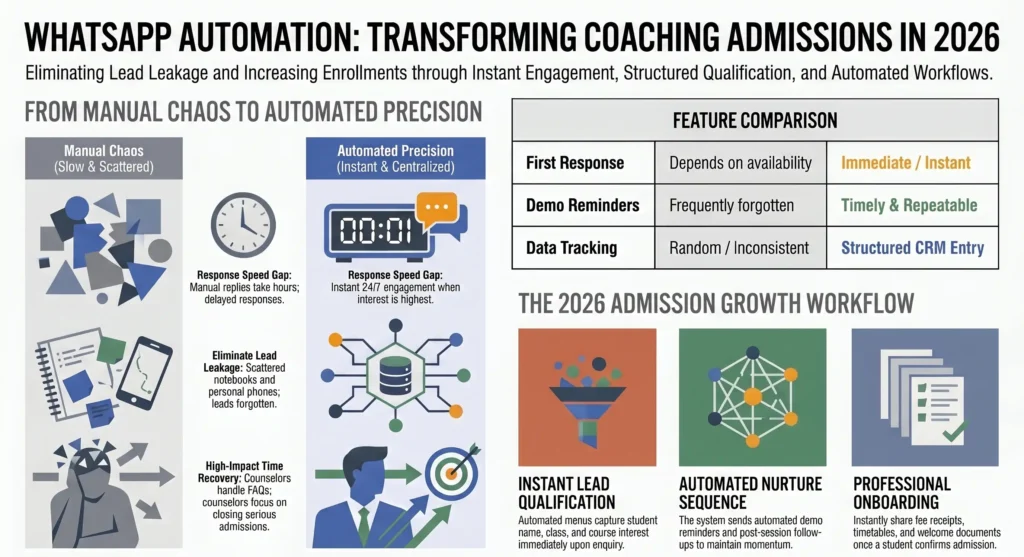
WhatsApp Automation for Coaching Institutes in India: How to Capture Leads, Send Demo Reminders, and Increase Admissions in 2026

A coaching institute does not usually lose admissions because its course is weak. It loses admissions because the enquiry was not handled at the right time.

A parent fills out a form at 9:30 PM. A student sends a WhatsApp message asking about fees. Someone clicks on an ad but does not get an immediate response. The office team plans to reply in the morning, but by then the same lead has already spoken to two other institutes.

This is the real admissions problem in 2026: lead delay, scattered follow-up, and no proper enquiry system.

That is exactly where WhatsApp automation for coaching institutes becomes valuable.

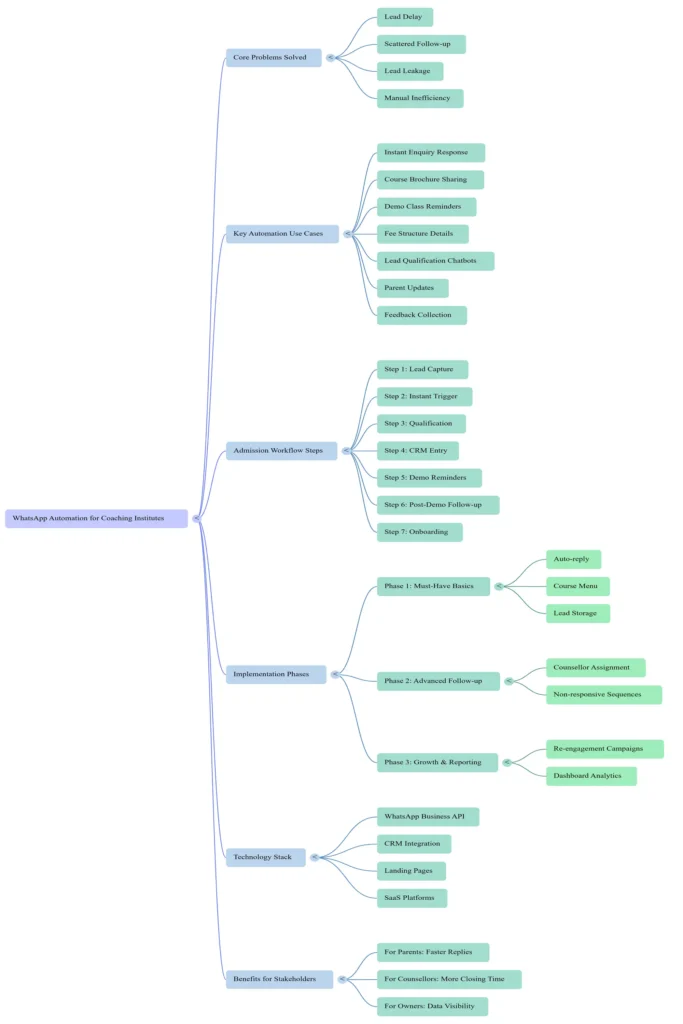
It is not just about sending bulk messages. It is about creating a smoother admission journey:

  • A new lead receives an instant reply.
  • The institute collects course interest, class level, city, and preferred batch.
  • The lead is assigned to a counsellor.
  • Demo reminders go automatically.
  • Missed follow-ups are reduced.
  • Parents receive fee details, class timing, and documents without waiting.

When done properly, WhatsApp automation helps an institute look faster, more professional, and easier to trust.

At WB Tech, we often see education businesses struggle with manual follow-up even when they are getting enquiries. Their issue is not always lead generation. In many cases, it is lead management. That is why automation, CRM, websites, and digital marketing should work together rather than separately.

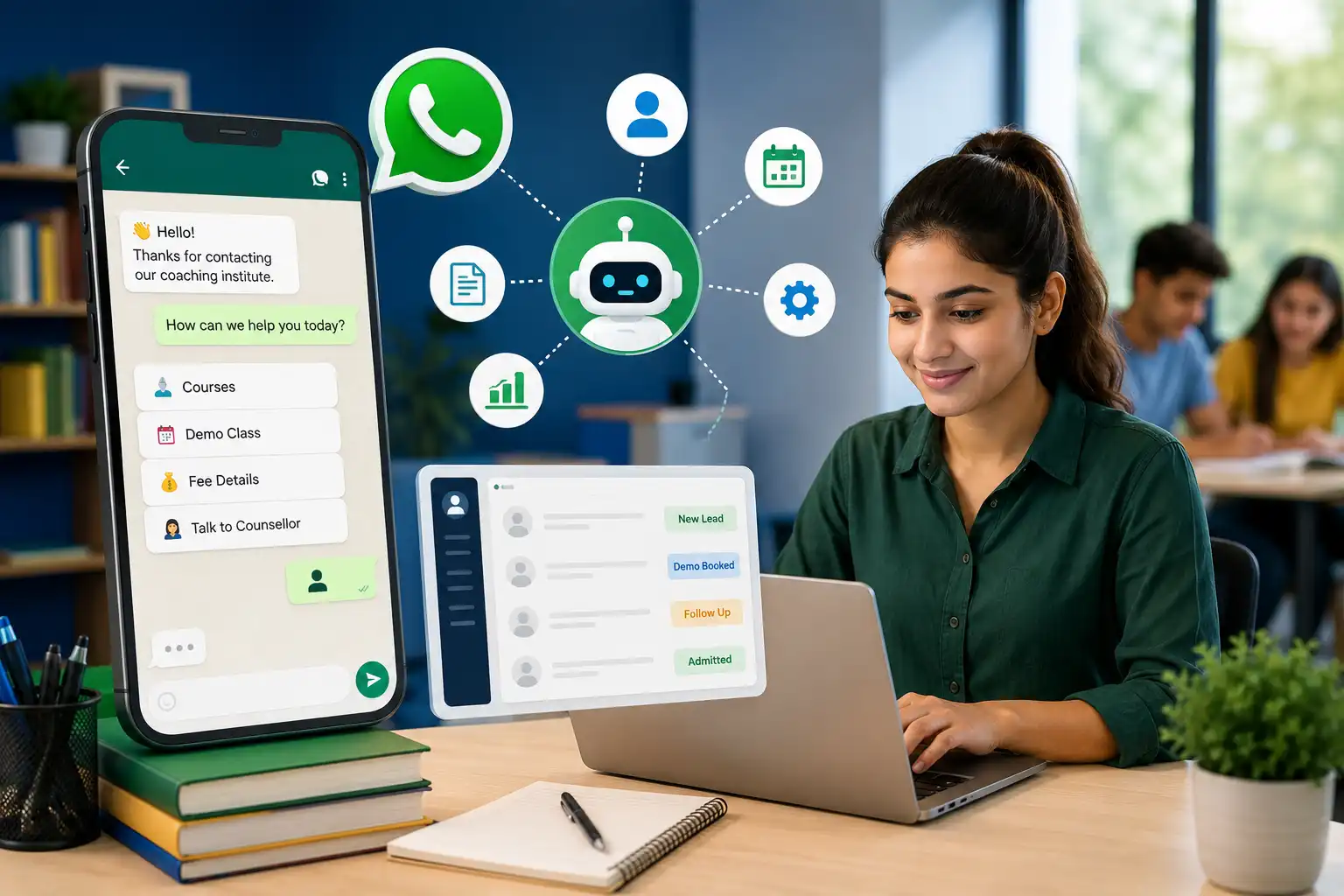
whatsapp automation

What Is WhatsApp Automation for Coaching Institutes?

WhatsApp automation is a system that helps coaching centers manage repetitive communication automatically while keeping important conversations personal.

For example, an institute can automate:

  • Instant responses to new enquiries
  • Course brochure sharing
  • Demo class confirmation
  • Batch timing information
  • Fee structure details
  • Admission reminders
  • Parent communication
  • Lead follow-up sequences
  • Feedback requests after demo sessions

This can be powered through:

  1. WhatsApp Business tools for basic communication
  2. WhatsApp Business Platform/API for advanced automation
  3. CRM integration for tracking every enquiry and follow-up
  4. Chatbots and workflows for 24/7 lead qualification

For institutes that already invest in ads, local SEO, and landing pages, automation becomes even more important. A lead should not fall into silence after clicking an ad or submitting a form. Your digital marketing system and your follow-up system must support each other.


Why Coaching Institutes Need WhatsApp Automation in 2026

The education market has become more competitive. Students and parents compare multiple institutes before deciding. They look at faculty, fees, success stories, convenience, batches, location, and response speed.

If one institute replies instantly and another replies after four hours, the faster institute often gets the first real conversation.

1. Parents Expect Faster Replies

Parents usually contact coaching institutes when they are actively considering admission. They may ask:

  • What is the fee?
  • Is there a demo class?
  • Which classes do you cover?
  • What are the batch timings?
  • Do you teach online or offline?

These are simple queries, but they come repeatedly. Automation can answer them immediately and route serious leads to the team.

2. Manual Follow-Up Creates Lead Leakage

A lead comes from Facebook Ads. Another comes from a website form. A third calls the office and asks to be contacted later. If these enquiries are tracked manually through notebooks, Excel sheets, and individual phones, some of them will definitely be missed.

This is where a custom CRM or SaaS-based admission system can support WhatsApp automation. Instead of remembering everything manually, the institute has one place to see:

  • New leads
  • Contacted leads
  • Demo booked
  • Demo attended
  • Follow-up pending
  • Admission confirmed
  • Lost leads

3. Demo Class Attendance Improves with Reminders

Many students agree to attend a demo, then forget. A simple reminder one day before and another reminder a few hours before can improve attendance.

These reminders can include:

  • Demo date
  • Time
  • Google Maps location
  • Online meeting link, if relevant
  • Name of faculty or counsellor

A polite automated reminder makes the institute feel organized without requiring staff to manually send the same message again and again.

4. Counsellors Get More Time for Real Conversations

Your team should spend time convincing serious leads, not copy-pasting the same fee message all day.

Automation handles the first layer of communication. Humans step in where trust, persuasion, and decision-making matter.

That balance is important. A coaching institute should never feel robotic. Automation should make the experience quicker, not colder.


How a WhatsApp Admission Automation Workflow Actually Works

Here is a practical workflow that coaching institutes can use.

Step 1: Lead Comes In

A lead may come from:

  • Google Ads
  • Meta Ads
  • Instagram profile
  • Website enquiry form
  • Landing page
  • Google Business Profile
  • Referral campaign

If you do not already have a conversion-focused website or campaign landing page, that should be fixed first. A strong website and app development system helps convert traffic into enquiries.

Step 2: Instant WhatsApp Message Is Triggered

The lead receives a message like:

Hello! Thank you for contacting Bright Future Academy. Please choose what you need help with:

  1. Class 9–10 Tuition
  2. NEET Coaching
  3. JEE Coaching
  4. Spoken English
  5. Talk to an admission counsellor

This is far better than leaving the lead with no response after a form submission.

Step 3: Lead Qualification Begins

The workflow can ask:

  • Student name
  • Current class or exam target
  • Preferred course
  • Online or offline preference
  • City or branch preference
  • Desired demo date

This creates a better handoff for the admission team.

Step 4: CRM Entry Is Created

A proper lead record is saved with source, course, date, and status. The counsellor can see context before calling.

This is especially useful when an institute is running multiple campaigns. Without tracking, teams often cannot answer basic questions such as:

  • Which ad campaign generated the best leads?
  • Which courses get the most enquiries?
  • Which counsellor closes more admissions?
  • Which leads never received a second follow-up?

Step 5: Demo or Counselling Reminder Goes Out

If the student selects a demo, the system can send:

  • Confirmation message
  • Calendar-style reminder copy
  • Location or meeting details
  • What to bring
  • Contact person details

Step 6: Post-Demo Follow-Up Is Sent

After a demo session:

  • Ask for feedback
  • Share fee plan
  • Offer admission assistance
  • Send deadline reminder, if relevant

This is often where institutes lose highly interested leads. They run the demo successfully, then delay the closing conversation.

Step 7: Admission Confirmation and Onboarding

Once the lead converts, automation can share:

  • Welcome message
  • Fee receipt instructions
  • Timetable
  • Class group link
  • Required documents
  • Orientation details

That small improvement can make the admission process feel far more professional.


10 High-Impact WhatsApp Automation Use Cases for Coaching Institutes

1. Instant Lead Reply

Every form, ad click, or enquiry should get an immediate acknowledgment. Even a short response reassures the parent that their message has been received.

2. Course Selection Menu

Rather than asking a vague question like “How can we help?”, offer options. Structured choices move the conversation forward faster.

3. Demo Class Booking

Students can select preferred dates or request a call for scheduling.

4. Demo Reminder Sequence

A simple automated reminder reduces missed demos and shows discipline.

5. Fee Structure Sharing

Instead of retyping fees repeatedly, the institute can send standardized information quickly.

6. Counsellor Assignment

Qualified leads can be automatically assigned based on course, branch, or availability.

7. Follow-Up for Non-Responsive Leads

Many parents say, “I will discuss and get back.” A planned follow-up sequence can help revive interest without sounding pushy.

8. Parent Updates

Institutes can use structured updates for attendance alerts, exam reminders, fee notices, or event communication.

9. Feedback Collection

After a demo or consultation, collect feedback quickly while the experience is fresh.

10. Re-Engagement Campaigns

Old leads can be nurtured with new batch announcements, crash course updates, scholarship tests, or free workshops.

For institutes already spending on ads, connecting this flow with performance-focused digital marketing creates a much stronger funnel.


WhatsApp Automation vs Manual Follow-Up: What Changes?

AreaManual ProcessAutomated Process
First responseDepends on staff availabilityImmediate
Data collectionRandom, inconsistentStructured
Demo remindersOften forgottenTimely and repeatable
Lead trackingNotebook / Excel / phone chatsCentralized CRM
Counsellor productivityRepetitive questions consume timeMore focus on closing
Missed follow-upsCommonEasier to track and reduce
ReportingWeak or absentBetter visibility

The goal is not to remove people from admissions. The goal is to remove chaos from admissions.


What Should a Coaching Institute Automate First?

A common mistake is trying to automate everything on day one. That usually creates an overcomplicated setup.

Start with the areas that reduce the most leakage:

Phase 1: Must-Have Basics

  • Instant auto-reply
  • Course selection menu
  • Lead capture form connected to WhatsApp
  • Demo booking prompt
  • Lead storage in CRM or database

Phase 2: Better Follow-Up

  • Demo reminders
  • Counsellor assignment
  • Post-demo follow-up messages
  • Non-responsive lead sequence

Phase 3: Growth Automation

  • Re-engagement campaigns
  • Parent communication flows
  • Fee reminder workflows
  • Student lifecycle communication
  • Dashboard reporting

If your institute is still deciding between a basic site, landing page, or custom solution, WB Tech’s guide on website cost in India in 2026 can help frame what kind of digital setup makes sense before automation.


Where CRM Fits into WhatsApp Automation

WhatsApp can start the conversation. A CRM helps manage the relationship.

Without CRM, the team may still struggle with:

  • Duplicate enquiries
  • No follow-up ownership
  • No source tracking
  • No pipeline visibility
  • No clear admission reporting

A coaching institute CRM can organize the journey from enquiry to enrollment. It can help teams understand:

  • Who needs a callback today
  • Which demo leads are hot
  • Which enquiries are still untouched
  • Which campaign brings quality admissions
  • Which branch or course performs best

This is why WhatsApp automation and CRM should be planned together, especially for growing institutes.

WB Tech already works across SaaS services and custom systems, which makes this kind of integration a practical next step for education businesses looking beyond basic marketing.


How WhatsApp Automation Supports Paid Ads and SEO

A lot of institutes spend money to generate traffic but do not build a strong post-click journey.

Let’s say you run:

  • Google Ads for “NEET coaching near me”
  • Meta Ads for “Class 10 board tuition”
  • SEO content around local educational queries

What happens after the click?

If the user reaches a poor page, leaves quickly, or submits a form and hears nothing back, the marketing spend loses value.

A better funnel looks like this:

  1. Search or ad click
  2. High-converting landing page
  3. Short enquiry form or click-to-WhatsApp CTA
  4. Immediate WhatsApp response
  5. Lead qualification
  6. Counsellor call
  7. Demo booking
  8. Admission follow-up

That is how digital marketing, website development, and automation work together.

If you want a broader perspective on local growth strategy, you can also read WB Tech’s guide on digital marketing for small businesses in Faridabad.


Sample WhatsApp Message Flow for a Coaching Institute

Below is a simple example of how a student enquiry flow can feel natural.

Message 1: Welcome

Hi! Welcome to Success Point Academy. Thank you for your interest. Please choose an option below so we can guide you better.

  1. School Tuition
  2. IIT-JEE
  3. NEET
  4. Spoken English
  5. Speak to a Counsellor

Message 2: Course-Specific Prompt

Great choice. Please share the student’s current class or exam target.

Message 3: Demo Interest

Would you like to book a free counselling session or demo class?

  1. Yes, book now
  2. Call me first
  3. Send fee details

Message 4: Demo Confirmation

Your demo request has been noted. Our team will confirm the slot shortly. You will also receive a reminder before the session.

Message 5: Follow-Up

We hope the information was helpful. Would you like our counsellor to explain the admission process and batch options?

This is not about sounding automated. It is about sounding organized.


Common Mistakes Coaching Institutes Make with WhatsApp Automation

Mistake 1: Using Only Bulk Promotion

WhatsApp is not just for broadcasting offers. If every message is promotional, people ignore it. Use it for support, guidance, reminders, and smooth service.

Mistake 2: Asking Too Many Questions at Once

A long form-like chat reduces responses. Ask only what helps move the lead forward.

Mistake 3: No Human Handoff

If a serious lead wants to speak to someone, the system should make that easy. Automation must support conversation, not block it.

Mistake 4: Not Connecting Leads to CRM

If the data remains scattered across personal phones, the institute still has the same old operational problem.

Mistake 5: No Follow-Up Logic

Sending one message and stopping is not a strategy. There should be a clear plan for new leads, demo-booked leads, demo-attended leads, and inactive leads.


How Much Does WhatsApp Automation for Coaching Institutes Cost?

The cost depends on the depth of the system.

A basic setup may include:

  • WhatsApp response flow
  • Enquiry form connection
  • Course menu
  • Simple auto-replies

A more advanced setup may include:

  • WhatsApp Business Platform integration
  • Custom CRM
  • Multi-counsellor lead assignment
  • Demo reminders
  • Lead status tracking
  • Campaign source tracking
  • Admin dashboard
  • Follow-up automation

Instead of thinking only about software cost, it is smarter to think about lead leakage cost. If an institute receives a healthy number of enquiries every month but loses them due to slow replies or no second follow-up, the hidden loss can be much higher than the automation investment.

For businesses comparing budget options across services, WB Tech’s pricing page gives a broader view of service planning.


Is WhatsApp Automation Useful for Small Coaching Centers Too?

Yes. In fact, smaller institutes often benefit quickly because their team is usually stretched.

If one or two people are managing:

  • Teaching
  • Parent calls
  • Admissions
  • Social media
  • Demo scheduling

then repetitive communication becomes exhausting.

A simple automation setup can make a small coaching business feel more responsive without hiring a large front desk team immediately.

The institute still needs good teaching, trust, and reputation. Automation does not replace that. It simply makes sure interested students are not lost before a proper conversation begins.


When Should a Coaching Institute Invest in WhatsApp Automation?

You should seriously consider it if:

  • You receive regular enquiries from ads or social media
  • Your staff replies late during busy hours
  • Leads are stored across many phone numbers
  • You lose track of demo follow-ups
  • Parents repeatedly ask the same questions
  • You want structured admission reporting
  • You plan to scale to multiple branches or courses

If at least three of these points sound familiar, automation is no longer a “nice to have.” It becomes part of your admissions infrastructure.


Why Work with WB Tech for Coaching Institute Automation?

Many vendors can set up a chatbot. But a useful education automation system needs more than a chatbot.

It should understand:

  • How enquiries arrive
  • How parents ask questions
  • How counsellors close admissions
  • How landing pages, ads, and CRM connect
  • How follow-up should feel personal rather than spammy

WB Tech works across digital marketing, websites and apps, and SaaS solutions. That matters because the best automation projects are not isolated tools. They are part of a complete growth funnel.

If your coaching institute wants:

  • Faster lead response
  • Better demo attendance
  • Cleaner lead tracking
  • More professional parent communication
  • A connected marketing-to-admission system

then WhatsApp automation is worth exploring seriously.

whatsapp-automation

Final Thoughts

Admissions are won in moments.

A fast reply. A clear answer. A well-timed reminder. A counsellor who already knows what the student is looking for. These small details create a smoother, more convincing journey.

WhatsApp automation for coaching institutes is not about replacing human communication. It is about making sure human communication happens at the right time, with the right context, and without unnecessary delay.

In a competitive education market, that can become a real business advantage.


FAQ: WhatsApp Automation for Coaching Institutes

1. What is WhatsApp automation for coaching institutes?

It is a system that helps institutes automate enquiry replies, collect student details, send demo reminders, manage follow-up, and improve communication during the admission journey.

2. Can WhatsApp automation increase admissions?

It can support admissions by reducing response delays, improving follow-up consistency, and helping counsellors focus on serious leads.

3. Do coaching institutes need CRM with WhatsApp automation?

If the institute receives regular enquiries, CRM becomes highly useful because it tracks lead status, counsellor ownership, and follow-up history.

4. Can small tuition centers use WhatsApp automation?

Yes. Even a simple setup can help small institutes reply faster and manage enquiries more professionally.

5. Can WhatsApp automation be connected with website forms and ads?

Yes. Leads from landing pages, websites, and advertising campaigns can be routed into WhatsApp and tracked in a centralized system.

6. What should be automated first?

Start with instant lead reply, course selection, demo booking prompts, and reminder flows before moving into advanced CRM and analytics.

7. Is WhatsApp automation only for promotions?

No. It is most valuable when used for enquiry management, admissions support, reminders, parent communication, and follow-up workflows.

8. Can WB Tech build a custom WhatsApp admission system?

Yes. WB Tech can combine marketing, websites, custom SaaS, CRM workflows, and automation into a connected admission system for coaching institutes.

How Do I Choose the Right SaaS Platform for My Business?

Choosing the wrong SaaS platform can quietly drain thousands of rupees, kill your team’s productivity, and leave you locked into a tool that does 60% of what you actually need.

Choosing the right one? It can automate your operations, reduce your overhead, and scale with your business without you having to hire three extra people to manage the workload.

The problem is that in 2026, the SaaS market is overwhelming. There are hundreds of platforms competing for your attention — every one of them promising to be the “all-in-one solution” your business has been waiting for. So how do you cut through the noise and actually pick what works?

That is exactly what this guide is for.

At WB Tech, we have built and implemented SaaS solutions for businesses across industries — from gym management systems and HR tools to e-commerce platforms and customer management systems. We have seen what goes wrong when businesses choose in a hurry, and we have seen what right looks like. This is that knowledge, laid out practically.


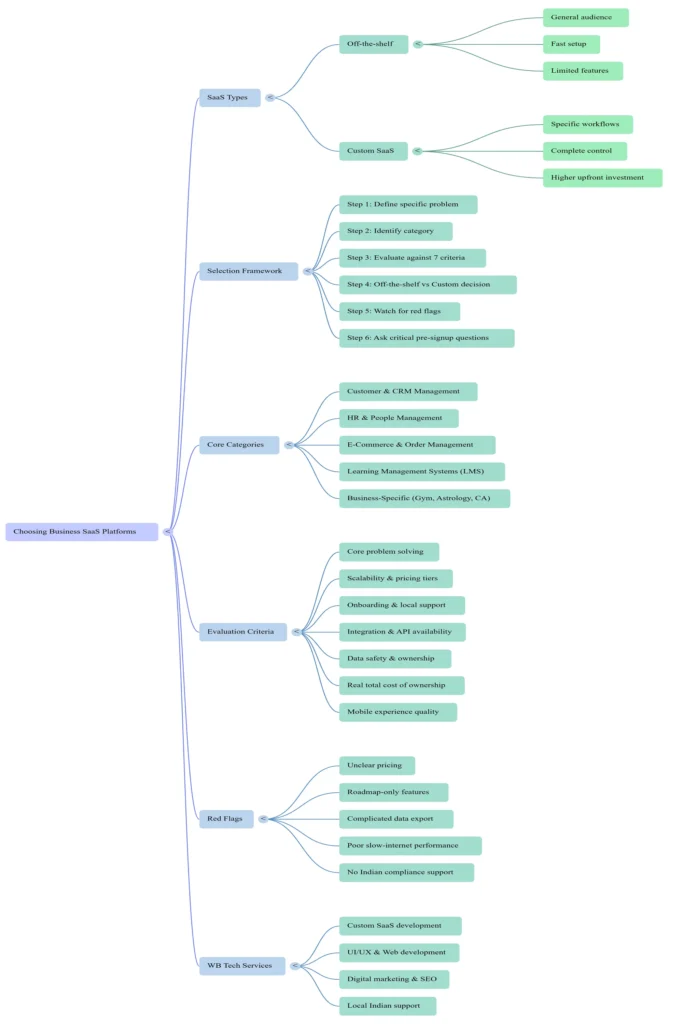
First, Understand What SaaS Actually Is (And Is Not)

SaaS stands for Software as a Service. Instead of buying a software licence and installing it on your computers, you subscribe to a cloud-based application that you access through a browser or app. You pay monthly or annually, the provider handles updates and maintenance, and you can typically access it from anywhere.

Think of tools like Google Workspace, Zoho CRM, QuickBooks, or any HR management system you might use. All SaaS.

But here is what most businesses miss: there are two fundamentally different types of SaaS decisions you will face.

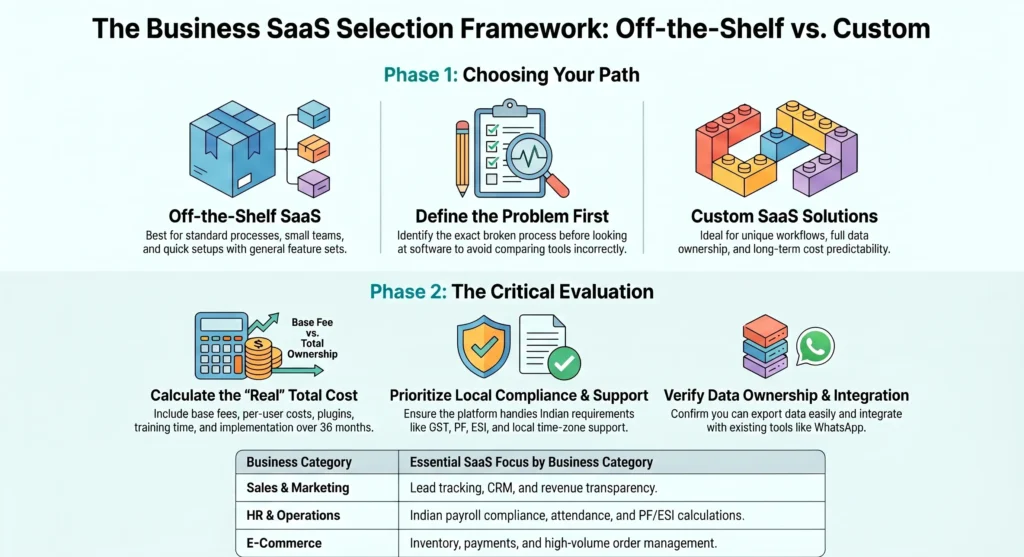
Type 1 — Off-the-shelf SaaS: You subscribe to an existing platform built for a general audience. Fast to set up, usually affordable to start, but limited to whatever features the platform decides to include.

Type 2 — Custom SaaS: A platform built specifically for your business, your workflows, and your exact requirements. Takes more time and investment upfront, but gives you complete control and no compromises.

Understanding which category you actually need is the very first decision — and most businesses skip it entirely, which is where the trouble begins.


Step 1 — Get Crystal Clear on What Problem You Are Actually Solving

Before you Google a single platform, open a document and write down the specific problem you want to solve. Not “we need better software” — that is too vague. Be specific.

  • Are your sales team’s leads falling through the cracks because there is no proper follow-up system?
  • Is your HR team drowning in spreadsheets for attendance, payroll, and leave management?
  • Are you running a gym or coaching centre where memberships, renewals, and billing are all done manually?
  • Are you building an e-commerce store and need inventory, orders, and customer data all in one place?
  • Do you need to manage a learning management system for students or employees?

Each of these problems maps to a completely different category of SaaS platform. If you do not define the problem tightly, you end up evaluating tools that are solving completely different things and comparing them incorrectly.

At WB Tech, before we recommend or build anything for a client, we spend time understanding the workflow from end to end. Not the software they think they need — the actual process that is broken, slow, or creating friction. The right solution almost always reveals itself once you understand the problem properly.


Step 2 — Know the 5 Categories Most Indian Businesses Actually Need

The SaaS landscape can feel infinite, but in practice, most small and mid-sized businesses in India need solutions from one or more of these five categories:

1. Customer & CRM Management

This is about tracking your leads, managing your sales pipeline, following up with customers systematically, and understanding your revenue at a glance.

If your team is tracking prospects in WhatsApp chats or Excel sheets, you need a CRM. The question is whether a generic tool works for you or whether your sales process is unique enough to warrant a custom Customer Management System built around how your business actually works.

2. HR & People Management

Attendance, leave management, payroll, employee records, performance tracking — if any of this feels chaotic, you need an HRM platform. Off-the-shelf options exist but often do not account for India-specific payroll structures, PF/ESI calculations, or the informal workflows that many growing businesses run on.

WB Tech’s HR Management System is built specifically for Indian businesses — accounting for local compliance requirements, flexible team structures, and the kind of reporting that actually helps management make decisions.

3. E-Commerce & Order Management

If you are selling products online, you need a platform that handles your catalogue, orders, inventory, payments, and customer data. The off-the-shelf options here — Shopify, WooCommerce — are excellent starting points. But as your order volumes grow and your operations get more complex, custom e-commerce solutions become significantly more cost-effective than paying rising transaction fees and plugin costs.

4. Learning Management Systems (LMS)

If you are running a coaching institute, corporate training programme, or educational platform, you need an LMS — a platform that hosts your courses, manages students, tracks progress, and handles certifications. Generic platforms work until you need specific features: custom branding, regional language support, or integration with your existing payment systems.

5. Business-Specific Management Systems

This is the category that most generic SaaS platforms completely ignore. Gym management. Astrology practice management. CA/CS knowledge platforms. Industry-specific booking and scheduling systems.

These businesses exist everywhere in India, and they are constantly trying to stitch together three or four generic tools to do what one properly built custom system could do seamlessly. This is exactly where WB Tech specialises — building specialised management systems for businesses with needs that off-the-shelf tools simply cannot meet.


Step 3 — Evaluate Any Platform Against These 7 Criteria

Whether you are evaluating an off-the-shelf SaaS tool or considering a custom build, run every option through this checklist.

1. Does It Solve Your Core Problem — Actually?

Not theoretically. Not with a workaround. Open the tool and try to do the exact task that is currently broken in your business. If it takes more than a few clicks and you are already reading the documentation to do something basic, that is a red flag.

2. Can It Scale With You?

A platform that works well for 10 customers and 3 employees may fall apart at 500 customers and 50 employees. Ask: what happens to the pricing when you add more users? What features are locked behind the higher tiers? Will you be re-evaluating this entire decision in 18 months?

3. What Does Onboarding and Support Look Like?

This is where Indian businesses often get burned. Many global SaaS platforms have support that operates in completely different time zones, takes days to respond, and gives you documentation links instead of actual help. Before committing, test the support. Send a chat message. Call if there is a number. See what actually happens.

When you build a custom SaaS solution with WB Tech, your support is direct — our team, in your timezone, who built the system and understands your specific setup.

4. How Does It Integrate With What You Already Use?

Most businesses have existing tools — a WhatsApp workflow, a payment gateway, an accounting system, an existing website. A new SaaS platform that cannot talk to any of these creates more work, not less. Check for API availability and native integrations before committing.

WB Tech provides API integration services as part of our development work, so your custom system connects with whatever tools you already rely on — rather than forcing you to abandon them.

5. Is Your Data Safe and Who Owns It?

This is a question most people forget to ask until it is too late. Where is your customer data stored? What happens to it if you stop paying? Can you export everything cleanly if you decide to switch? These are not paranoid questions — they are basic business hygiene.

6. What Is the Real Total Cost?

The subscription price is rarely the full cost. Add up: the base plan fee, the cost per additional user, the add-ons you will eventually need, the implementation time, the training time, and the ongoing support costs. A ₹1,500/month tool that requires three plugins, two integrations, and a consultant to configure is not cheaper than a custom-built system over a 3-year horizon.

7. Does It Have a Mobile Experience That Actually Works?

In India in 2026, your team is on phones as much as desktops. If the mobile app is a stripped-down afterthought, your field team, your managers-on-the-move, and your remote staff will quietly stop using the tool within a month.


Step 4 — The Off-the-Shelf vs. Custom SaaS Decision

This is the question that determines everything, and most businesses make the decision based on the wrong factors — usually initial cost.

Here is a clearer framework:

Go with an off-the-shelf SaaS platform if:

  • Your business processes are fairly standard and match what the platform is designed for
  • You are just starting out and need something working quickly
  • Your team is small and the per-user pricing makes sense
  • The platform’s limitations do not prevent you from doing core business tasks

Consider a custom SaaS solution if:

  • Your workflow is unique to your industry or business model
  • You are paying for three or four separate tools to do what one integrated system could do
  • You have outgrown your current tools and are hitting walls constantly
  • You need specific integrations, custom reports, or features the market simply does not offer
  • You want full data ownership and long-term cost predictability

The honest reality: many growing Indian businesses hit a point — usually around 2–3 years in — where the patchwork of generic tools is costing more in time, errors, and monthly fees than a well-built custom system would have. At WB Tech, we help businesses do that cost analysis properly before committing to either path.


Step 5 — Red Flags to Watch Out For When Evaluating SaaS Platforms

Beyond the criteria above, watch out for these warning signs during evaluation:

Pricing that is deliberately unclear. If you cannot figure out what you will actually pay per month after 10 minutes on the pricing page, that is intentional. The real cost will surprise you once you are committed.

“Coming soon” features that are core to your needs. If the sales team is promising features on the roadmap, those features do not exist for your evaluation. Judge what is there today.

Complicated data export process. If getting your own data out requires submitting a ticket and waiting 30 days, you are not a customer — you are locked in.

Poor performance on slow internet connections. India’s connectivity varies significantly across cities and neighbourhoods. A platform that crawls on anything less than a fast broadband connection is going to cause daily frustration for your team.

No local support or understanding of Indian compliance. GST, TDS, PF, ESI — if your SaaS platform has no idea what these are, your accounts and HR teams will be doing manual workarounds constantly.


Step 6 — Questions to Ask Before You Sign Up for Anything

Before committing to any SaaS platform — off-the-shelf or custom — get answers to these:

  1. Can I try this for at least 14 days without giving my card details?
  2. What does cancellation look like, and what happens to my data?
  3. Is there a free onboarding call or demo with a real person?
  4. What are actual users saying on independent review platforms?
  5. If my team grows from 5 to 50 people, what does the pricing look like?
  6. What integrations are available, and which require a paid add-on?
  7. How often does the platform go down, and what is the uptime guarantee?

If the platform or vendor cannot answer these clearly, that tells you something important.

SaaS CategoryCore FunctionsTarget UsersSelection CriteriaEvaluation Red FlagsDeployment TypeCompliance Support (Inferred)
Customer & CRM ManagementTracking leads, managing sales pipeline, systematic follow-ups, and revenue overview.Indian businesses with unique sales processes or those tracking prospects in WhatsApp/Excel.API availability, native integrations, scalability, mobile experience, and data ownership.Hidden pricing, “coming soon” features, complicated data export, and no local support.Off-the-shelf or Custom-built (WB Tech)High (Integration with Indian payment gateways and local workflow needs).
HR & People ManagementAttendance, leave management, payroll, employee records, and performance tracking.Indian businesses needing to replace chaotic spreadsheets and manual HR workflows.India-specific payroll structures, PF/ESI calculations, local support, and onboarding quality.No understanding of Indian compliance, lack of local support, and poor mobile app.Custom-built (WB Tech specialized)High (Explicit focus on GST, PF, TDS, and ESI compliance).
E-Commerce & Order ManagementCatalogue management, orders, inventory, payments, and customer data tracking.Growing online sellers outgrowing Shopify/WooCommerce transaction fees.Total cost of ownership over 3 years and integration with existing website/WhatsApp.Rising transaction fees, expensive plugin costs, and poor performance on slow internet.Off-the-shelf or Custom-built (WB Tech)High (GST compliance and Indian payment gateway integration).
Business-Specific Management SystemsIndustry-specific booking, scheduling, and specialized operations management.Gyms, coaching centres, astrology practices, and CA/CS firms.Workflow alignment (not workarounds), scalability for 50+ employees, and data safety.Stitching together multiple generic tools and high per-user pricing at scale.Custom-built (WB Tech specialized)High (Tailored for Indian industry regulations and local bookkeeping).
Learning Management Systems (LMS)Hosting courses, managing students, tracking progress, and handling certifications.Coaching institutes, corporate training programmes, and educational platforms in India.Custom branding, regional language support, and payment system integration.Lack of regional language support and “Not in source”.Off-the-shelf or Custom-built (WB Tech)Moderate (Support for local payment systems and Indian student data).

When to Call a Technology Partner Instead of Trying to Figure It Out Alone

Most business owners are not technology experts, and they should not have to be. The time spent evaluating dozens of SaaS platforms, configuring them, training your team, and troubleshooting when things break is time not spent running your business.

This is where a technology partner like WB Tech actually earns its value.

We do not just build software. We sit with you, understand your operations, identify where the friction is, and then tell you honestly whether an existing platform solves it — or whether a custom build makes more sense for your specific situation and budget. If an off-the-shelf tool works perfectly for you, we will tell you that. If your needs are specific enough that you need something built, we will build it — on time, within budget, and with proper support afterward.

Our SaaS Services cover the full range: Gym Management Systems, HR Management Tools, E-Commerce Business Solutions, Learning Management Systems, Customer Management Systems, CA/CS Knowledge Hubs, Astrology Management Systems, and Service API providers. Whatever the management problem, we have either already built something like it or we have the team to build it for you.

And beyond the software itself, we also help with everything that makes a SaaS business visible — the website that converts visitors into trial users, the UI/UX design that makes your product feel professional and trustworthy, and the digital marketing strategy that gets the right businesses to find you in the first place.


A Practical SaaS Selection Checklist — Save This

Use this before making any decision:

Define the Problem

  • Written down the specific workflow or process that needs to change
  • Identified who on the team is most affected and what they need

Research Phase

  • Listed 3–5 platforms that address this specific category
  • Checked independent reviews (G2, Capterra, Trustpilot)
  • Confirmed India-specific compliance support where needed

Evaluation Phase

  • Trialled the shortlisted platforms with real tasks from your workflow
  • Tested mobile experience specifically
  • Tested support response time
  • Understood full pricing including per-user costs and add-ons

Decision Phase

  • Compared total cost of ownership over 24–36 months
  • Confirmed data export and ownership terms
  • Decided between off-the-shelf and custom based on fit, not just upfront price

Implementation Phase

  • Identified who is responsible for onboarding and training
  • Planned a pilot with a small group before full rollout
  • Set a 90-day review point to evaluate whether the tool is actually being used

Final Thought

There is no universally “right” SaaS platform — there is only the right platform for your business, your team, your workflows, and your growth plans. The businesses that get this right spend time on the front end understanding what they actually need before committing to anything. The ones that get it wrong jump at a shiny tool, realise three months in that it does not quite fit, and either live with the friction or start the whole evaluation process over.

Do not be the second type.

If you are at the point where you know something needs to change but you are not sure what the right technology path looks like, we are happy to have that conversation. No pitch, no pressure — just a straightforward discussion about your business and what would actually make a difference.

Get in touch with the WB Tech team at webesidetechnology.in/contact or WhatsApp us directly at +91 88-6087-6087. If you want to see what we have already built, the WB Tech portfolio is a good place to start.


Frequently Asked Questions

What is the difference between SaaS and custom software? SaaS is a subscription-based cloud application built for a general audience. Custom software is built specifically for your business. SaaS is faster and cheaper to start; custom gives you full control and better long-term fit for unique workflows.

How do I know if I need a custom SaaS solution? If you are regularly working around your current tools’ limitations, paying for multiple tools that should be one system, or running business processes that no existing platform handles well — you likely need something custom. WB Tech offers a free consultation to help you make this call.

What SaaS systems does WB Tech build? We build Gym Management Systems, HR Management Tools, LMS platforms, E-Commerce Solutions, Customer Management Systems, CA/CS Hubs, Astrology Management Systems, and Service API providers. See our full SaaS services page for details.

Is it expensive to build a custom SaaS platform? The cost depends on complexity and scope. We offer a first-project discount of up to 25% and transparent pricing. In many cases, the long-term cost of a custom system is lower than years of subscription fees across multiple off-the-shelf tools.

Can WB Tech help with the website and marketing for my SaaS product too? Yes — we offer everything from web and app development and UI/UX design to full digital marketing services including SEO, Google Ads, and Meta Ads, all under one roof.

How do I get in touch with WB Tech? Visit webesidetechnology.in/contact, call +91 88-6087-6087, or WhatsApp us directly. We are based in Faridabad, Haryana, and work with clients across India.


Related Reading from WB Tech


Written by the WB Tech Team — web development, SaaS, and digital marketing experts helping Indian businesses build smarter, grow faster, and operate better.

WB Tech (Webeside Technology) | 3H-47, NIT 3, Faridabad, Haryana | +91 88-6087-6087 | Info@webeside.in

webesidetechnology.in

HRMS Software Development Services: Why Your Business Needs a Custom HRM Tool in 2026

Running a business with 10 employees is manageable. Running one with 80, 200, or 500 employees without the right system? That is where things start falling through the cracks. Attendance gets miscounted. Payroll runs late. Performance reviews pile up in someone’s inbox and never get done. Leave requests get lost in WhatsApp threads. If any of this sounds familiar, you are not alone — and you are not stuck.

The answer is not hiring more HR staff. The answer is smarter technology. Specifically, it is a well-built, custom HRMS software solution that actually fits the way your company works — not a one-size-fits-all tool that forces your team to adapt to it.

At WB Tech (Webeside Technology), we have built custom HRM tools for businesses across industries, and in this post we want to walk you through everything you need to know — what HRMS is, why custom-built beats off-the-shelf, what features matter, and how to get started without the headache.

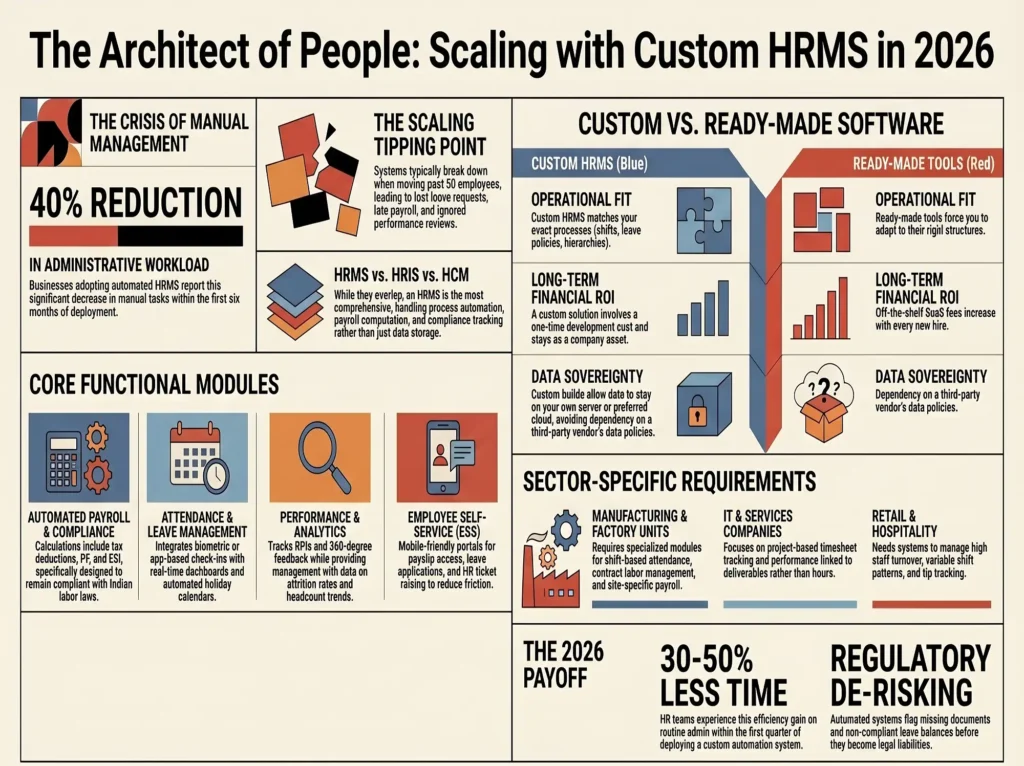
Quick Stat: Businesses that adopt automated HR management systems report up to 40% reduction in administrative HR workload and a measurable improvement in employee satisfaction scores within the first six months of deployment.

hrms

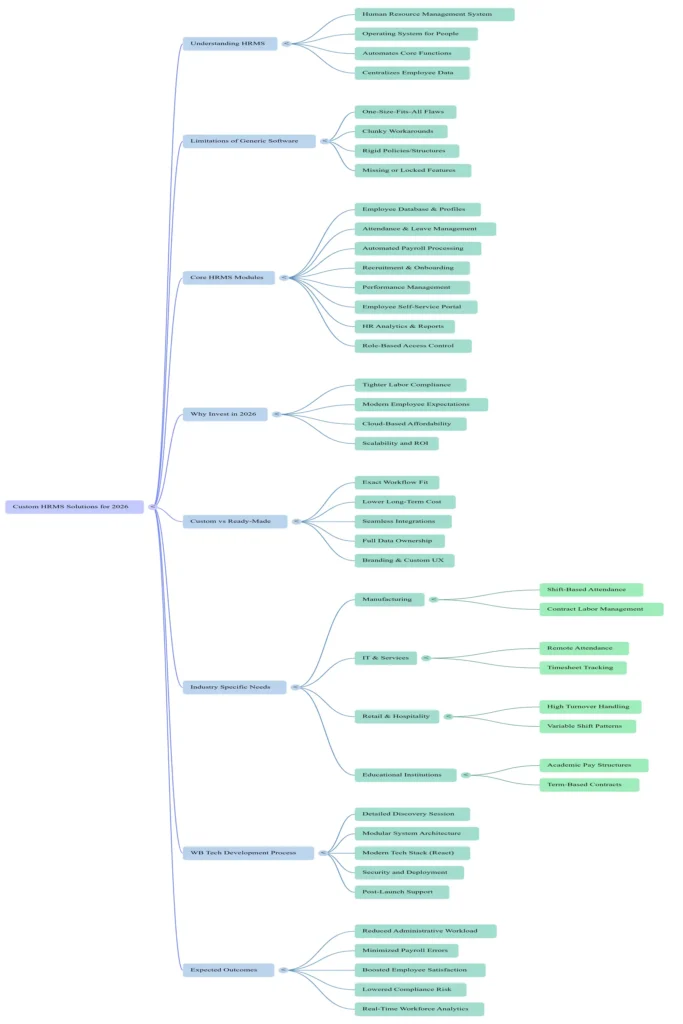
What Exactly Is an HRMS?

HRMS stands for Human Resource Management System. It is a software platform that centralises and automates the core functions of your HR department — from hiring and onboarding to attendance, payroll, performance, and even employee exit processes.

Think of it as the operating system for your people. Just like your accounting software handles invoices and taxes, your HRMS handles everything related to your workforce. And when it is built right, it connects all these functions so your HR team is not jumping between five different tools and two spreadsheets to do one task.

Some businesses confuse HRMS with HRIS (Human Resource Information System) or HCM (Human Capital Management). While they overlap, an HRMS is typically the most comprehensive — it handles not just data storage but actual process automation, payroll computation, compliance tracking, and analytics.


The Real Problem with Generic HR Software

There are dozens of ready-made HR software products in the market. Some are globally known brands. And yet, businesses keep coming to us frustrated with them. Why? Because off-the-shelf HRMS tools are designed for an average company that does not exist.

Your company has its own shift structures, leave policies, appraisal cycles, department hierarchies, and reporting needs. A generic tool will either not support some of these features or force you into clunky workarounds. You end up paying for modules you do not need while the features you do need are missing or locked behind expensive enterprise plans.

Custom HRMS software development solves this by building the system around your actual workflows, not the other way around. You get exactly what you need, nothing more, nothing less — and the system grows as your company grows.


Core Features of a Well-Built HRMS

Before jumping into development, it helps to understand what a strong HR management system should cover. Here are the modules that matter most:

�� Employee Database & ProfilesCentralised employee records with documents, contracts, emergency contacts, roles, and full history — all in one place.�� Attendance & Leave ManagementBiometric or app-based check-ins, leave request workflows, holiday calendars, and real-time attendance dashboards.
�� Payroll ProcessingAutomated salary calculations with tax deductions, PF, ESI, bonuses, and payslip generation compliant with Indian labour laws.�� Recruitment & OnboardingJob postings, applicant tracking, interview scheduling, offer letters, and digital onboarding checklists.
�� Performance ManagementGoal setting, KPI tracking, 360-degree feedback, appraisal cycles, and manager review workflows.�� Employee Self-Service PortalMobile-friendly portal where employees can apply for leaves, view payslips, update details, and raise HR tickets.
�� HR Analytics & ReportsAttrition rates, headcount trends, leave utilisation, cost per hire — real data to make better workforce decisions.�� Role-Based Access ControlDifferent access levels for employees, managers, HR admins, and top management to protect sensitive data.

Depending on your business type, you might also need features like shift scheduling, training management, expense reimbursement tracking, or integration with your existing accounting software. A good HRMS development company will scope all of this before writing a single line of code.


Why 2026 Is the Right Year to Invest in HR Automation

The conversation around digital transformation has been going on for years, but 2026 is different. The regulatory environment in India has tightened around labour compliance — from EPF and ESI filings to state-specific rules that differ between Haryana, Maharashtra, Karnataka, and other states. Keeping track of these manually is not just tedious, it is a liability.

At the same time, employees’ expectations have shifted. People who join your company in 2026 are used to clean, fast, mobile-first experiences in every other area of their lives. When your HR process means filling out paper forms or chasing HR over WhatsApp for a payslip, it creates friction that affects both productivity and retention.

Cloud-based HR management software also became far more affordable with the rise of SaaS development models. You do not need to invest in heavy infrastructure. A well-built system can be hosted on the cloud, accessed from any device, and scaled up as your headcount grows — all at a predictable cost.


Custom HRMS vs Ready-Made Software: A Straight Comparison

We get this question constantly: ‘Why should I build custom when I can just subscribe to an existing tool?’ Fair question. Here is the honest answer:

Fit: Custom HRMS matches your processes exactly. Ready-made tools make your processes match theirs.

Cost over time: Per-user SaaS fees add up fast as your team grows. A custom solution has a one-time development cost and stays yours.

Integrations: Custom systems integrate cleanly with your existing ERP, CRM, accounting tools, or third-party APIs. Off-the-shelf tools often charge extra or simply do not support your stack.

Data ownership: With a custom build, your data stays on your server or your preferred cloud. With SaaS products, you are dependent on the vendor’s data policies.

Branding & UX: A custom HRMS can carry your brand and be designed for your employees’ specific workflow, reducing training time significantly.

That said, custom development is not right for every business at every stage. If you are a 10-person startup, a ready-made tool may be perfectly adequate for now. But if you are scaling past 50 employees or managing complex HR workflows, the investment in a custom human resource management system pays for itself quickly.


HRMS for Different Business Types

Manufacturing & Factory Units

Shift-based attendance, contract labour management, site-specific payroll, and compliance reporting are non-negotiable in manufacturing. Generic software almost always fails here. A custom HRMS built for your plant’s reality — including biometric integrations, multi-shift scheduling, and overtime calculations — makes the difference.

IT & Services Companies

Flexible work hours, remote attendance, project-based timesheet tracking, and performance linked to deliverables rather than hours — these are the HR realities of tech companies. A well-designed employee management software for IT firms handles all of this smoothly.

Retail & Hospitality

High staff turnover, part-time employees, variable shift patterns, tip tracking, and seasonal hiring make HR particularly complex in retail and hospitality. Custom tools built for these industries save hours every week and dramatically reduce compliance errors.

Educational Institutions

Managing academic and non-academic staff with different pay structures, term-based contracts, examination duties, and student-staff ratio compliance calls for an HR system that understands education-specific rules — something most off-the-shelf tools simply do not.


The WB Tech Approach to HRMS Development

At Webeside Technology, we do not sell a product. We build solutions. Our HRMS development process starts with a detailed discovery session where we map out your current HR workflows, identify pain points, and understand your compliance requirements. From there, we design a system architecture that is modular — meaning you start with the features you need today and add more as your business grows.

We build using modern, scalable tech stacks — React on the frontend for a clean, fast user experience, and robust backend systems that handle high volumes of data reliably. Our HRMS solutions are mobile-responsive by default, and we always build with security best practices in mind — because your employee data deserves that protection.

We also handle deployment, training, and post-launch support. Getting a system built is one thing. Getting your team to actually use it is another — and that is a gap many development vendors ignore. We do not.

If you have been thinking about upgrading your digital presence beyond HR tools, you might also want to read our earlier post on why every small business needs a digital marketing strategy in 2026 — because your HR platform and your online presence are both pieces of the same business growth puzzle.


Key Questions to Ask Before Starting HRMS Development

If you are ready to move forward, here are the questions you should be walking into that first conversation with:

1. How many employees are we managing now, and how many do we expect in two years?

2. What are our most painful HR tasks today — the ones eating the most time or causing the most errors?

3. Do we have existing software (ERP, accounting, CRM) that the HRMS needs to integrate with?

4. What compliance requirements are specific to our industry and state?

5. Do we need a mobile app for employees, or is a mobile-responsive web portal sufficient?

6. What level of analytics and reporting does management need?

7. Who internally will own and manage the system after launch?

The clearer your answers, the faster and more accurately we can scope and build the right solution for you.

hrms services

What Does HRMS Development Actually Cost?

This is the question everyone wants answered, and the honest answer is: it depends. A basic HRMS covering attendance, leave, and payroll for a 50-person company looks very different from a full-featured platform with recruitment, performance management, analytics, and mobile apps for a 500-person organisation.

At WB Tech, we make sure you get value at every price point. We work with startups, mid-sized businesses, and larger enterprises — and we have pricing structures that make custom HR software development accessible even if you are not a large corporation. Visit our pricing page or get in touch for a free estimate tailored to your specific requirements.


The Payoff: What Changes After You Deploy a Good HRMS

Here is what businesses typically experience after deploying a properly built HR automation software:

• HR teams report spending 30-50% less time on routine administrative tasks within the first quarter.

• Payroll errors drop significantly because calculations are automated and cross-checked against attendance data automatically.

• Employee satisfaction improves because self-service features give people visibility and control over their own HR information.

• Compliance risk reduces because the system flags issues — missing documents, overdue appraisals, non-compliant leave balances — before they become problems.

• Management gets real data. Not intuition, not anecdote — actual workforce analytics that inform hiring, retention, and training decisions.

Module NamePrimary PurposeKey FunctionalitiesTarget UsersAutomation BenefitIndustry Applicability
Attendance & Leave ManagementTrack employee presence and manage time-off requests.Biometric or app-based check-ins, leave request workflows, holiday calendars, and real-time attendance dashboards.Employees, Managers, and HR AdminsEliminates miscounted attendance and lost leave requests; reduces administrative workload by up to 40%.Manufacturing (biometric integration and multi-shift scheduling); IT (remote attendance and flexible hours).
Payroll ProcessingAutomate salary distribution and legal compliance.Automated salary calculations, tax deductions (PF, ESI), bonuses, and payslip generation compliant with Indian laws.HR Admins, Finance Department, and EmployeesSignificant reduction in payroll errors; prevents late processing; ensures compliance with state-specific labour laws.Manufacturing (site-specific payroll and overtime); Retail (tip tracking); Education (term-based contracts).
Recruitment & OnboardingManage the talent acquisition lifecycle and new hire integration.Job postings, applicant tracking (ATS), interview scheduling, offer letters, and digital onboarding checklists.HR Admins, Hiring Managers, and CandidatesReduces cost per hire; replaces paper forms with digital experiences; prevents hiring process delays.Retail & Hospitality (high staff turnover and seasonal hiring).
Performance ManagementMonitor and evaluate employee growth and productivity.Goal setting, KPI tracking, 360-degree feedback, appraisal cycles, and manager review workflows.Managers, Employees, and HR AdminsPrevents review backlogs; flags overdue appraisals; links performance outcomes to specific deliverables.IT & Services (project-based timesheet tracking and deliverable-linked performance).
Employee Self-Service PortalEmpower employees to manage their own data and requests.Mobile-friendly portal for leave applications, viewing payslips, updating personal details, and raising HR tickets.EmployeesImproves employee satisfaction through visibility and control; reduces HR time spent on routine queries.General (suitable for mobile-first workforce expectations in 2026).
HR Analytics & ReportsProvide data-driven insights for workforce decision-making.Tracking attrition rates, headcount trends, leave utilisation, and cost per hire metrics.Top Management and HR AdminsReplaces intuition with real data; enables informed decisions on hiring, retention, and training.Education (student-staff ratio compliance reporting).
Bottom line: A great HRMS does not just make HR easier — it makes your entire organisation run better. When your people management is smooth, everything downstream — productivity, culture, growth — gets easier too.

Final Thoughts

If your HR department is still running on spreadsheets, WhatsApp groups, and manual processes, the cost of inaction is higher than you realise. Every hour your HR team spends on administrative work is an hour not spent on strategy, culture, or hiring the right people. Every payroll error or compliance miss is a reputational and financial risk that compounds over time.

Custom HRMS software development services are no longer the exclusive domain of large enterprises with big IT budgets. In 2026, the tools and expertise to build a proper HR management system are accessible to businesses of almost any size — and the ROI is measurable within months, not years.

At Webeside Technology (WB Tech), we build HRM tools that your team will actually use, your HR department will love, and your management will trust. Whether you are starting from scratch or replacing a system that has outgrown you, we have the experience and the approach to get it right.

Let’s build something that works for your people — and for your business.

Ready to Build Your HRMS?Tell us about your HR challenges and we’ll show you exactly what a custom solution can look like for your business. Free consultation, no commitment.Get a Free Consultation ->

WB Tech — Webeside Technology

We build websites, apps, SaaS tools, and digital marketing campaigns for businesses that mean business. Based in Faridabad, Haryana — serving clients across India and globally.

webesidetechnology.in  |  Info@webeside.in  |  +91 88-6087-6087

×

Get In Touch

Tell us about your requirement and our team will connect with you shortly.

×